PADCOACH Get it

FINGER DRUMMING TRAINER FOR PAD CONTROLLERS

You bought the pads. Now learn to play them.

You can build a beat on your MPC. Playing one live is different. Most of us hunt and peck: one pad at a time, index finger. PadCoach is like learning to type, but for your pads. Practice a few minutes a day on your own controller. Soon both hands move on their own, and the beat in your head goes straight onto the pads. No quantize needed.

Coming soon on theApp Store
In beta testing now
74 lessons 13 courses First 6 free One-time unlock, no subscription
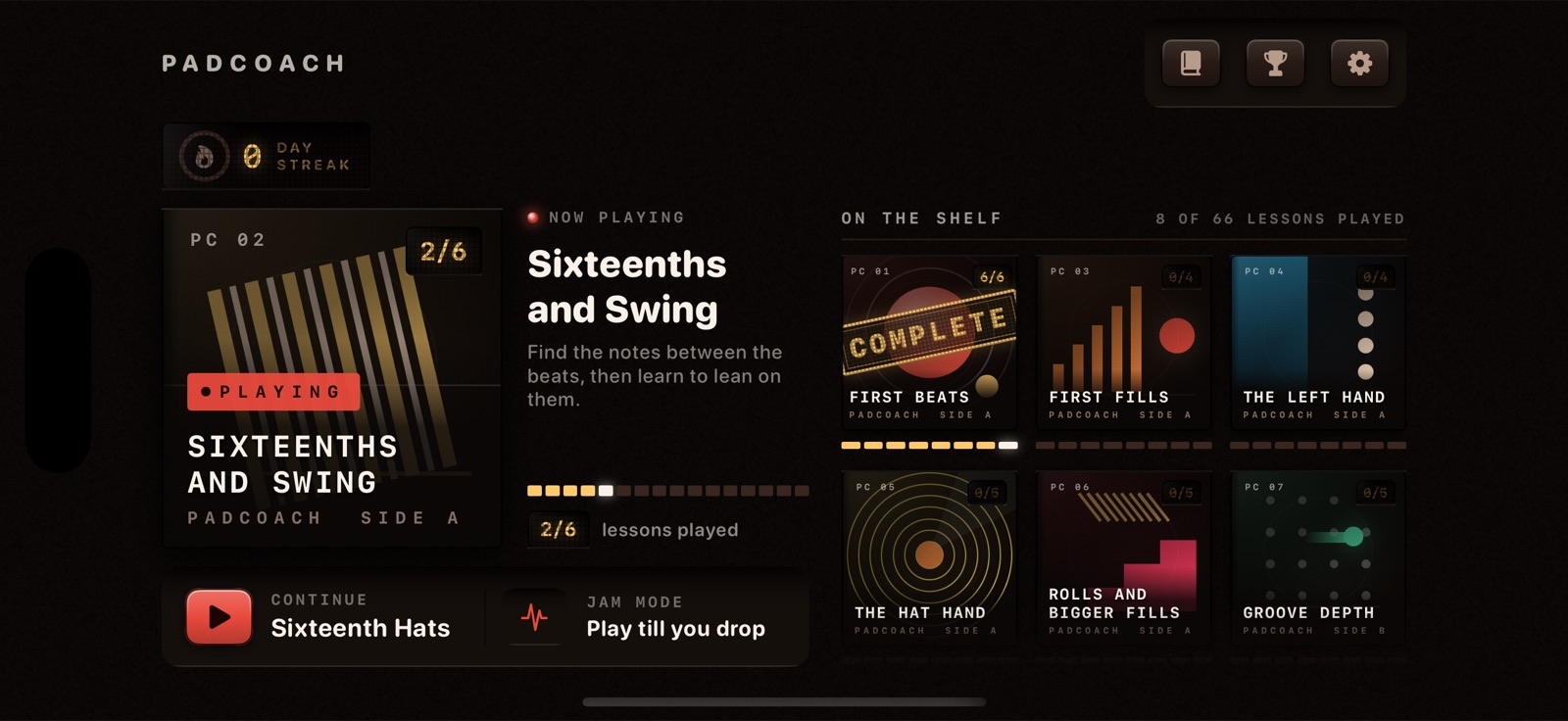
The PadCoach home screen: the current course shown as a large record sleeve with a Continue button, and the rest of the curriculum as a shelf of album covers.

01 / THE LESSON, RUNNING

This is what practice looks like.

Notes travel toward the playhead. Cream is your right hand, blue is your left, and the letter on the cap is the finger. Hit the pad as the note crosses the line. The bar below is the boom bap groove from lesson five: kick on 1 and the and of 3, snare on 2 and 4, straight eighth hats.

Simulation A recreation of a PadCoach lesson, built in the browser. It is not the actual app.

MPC PAD LAYOUT

Pad 1 kick, pad 2 snare, pad 3 closed hat, ascending left to right and bottom to top. The same map real hardware has used since the MPC60, so the muscle memory transfers.

Live recreation. Not a video. Shown with a MIDI controller connected: the highway takes the whole screen


02 / HOW IT WORKS

Three beats to playing.

01

Plug in your pads.

Connect your MPC or any pad controller over USB or Bluetooth. The lessons play on your hardware, on the layout it already has. No pads with you? The on-screen pads work too.

02

Follow the highway.

Every note tells you which pad, which hand, which finger, right before you need it. No sheet music. No pausing videos. No guessing what to practice today. You just play, and the skill builds underneath you.

03

Own the groove.

Each lesson teaches one new move, drills it, then folds it into a full beat. Every session ends with you playing real music, not exercises. Pass and you move on. Miss and you try again, with a slower speed offered, never forced.


03 / THE CURRICULUM

Thirteen records. Seventy-four tracks.

The courses are built like a record collection, in a set order: one new idea per lesson. The challenge grows through your hands, the pads and the patterns long before the tempo ever goes up.

The number stamped on each sleeve is how many lessons that course holds.

PC 01 6 lessons 6 FREE First BeatsPADCOACH SIDE A
First BeatsOne pad, then two hands, then a real boom bap groove.
PC 02 6 lessons Sixteenths and SwingPADCOACH SIDE A
Sixteenths and SwingFind the notes between the beats, then learn to lean on them.
PC 03 4 lessons First FillsPADCOACH SIDE A
First FillsPunctuation: how a phrase ends and the next one begins.
PC 04 4 lessons The Left HandPADCOACH SIDE A
The Left HandThe hand that was holding still: a second snare and two kicks in a row.
PC 05 5 lessons The Hat HandPADCOACH SIDE A
The Hat HandOpen it, choke it, and keep it moving all sixteen bars.
PC 06 8 lessons Rolls and Bigger FillsPADCOACH SIDE A
Rolls and Bigger FillsSnare rolls, tom runs and the most sampled bar in music.
PC 07 5 lessons Groove DepthPADCOACH SIDE B
Groove DepthMove a note you already own and the whole beat changes.
PC 08 7 lessons Drumming With DynamicsPADCOACH SIDE B
Drumming With DynamicsOptional depth: loud, soft and almost silent, on purpose.
PC 09 8 lessons Melodic IntegrationPADCOACH SIDE B
Melodic IntegrationHand the hat to your thumb and play a melody on top.
PC 10 4 lessons FluencyPADCOACH SIDE B
FluencyFull kit, full phrases, one take.
R PC 11 7 lessons Right Hand DexterityPADCOACH SIDE B
Right Hand DexterityOptional depth: snare-book drills for the hand that keeps time.
L PC 12 6 lessons Left Hand DexterityPADCOACH SIDE B
Left Hand DexterityOptional depth: the same six drills on the hand that has to catch up.
RL PC 13 4 lessons Both Hands DexterityPADCOACH SIDE B
Both Hands DexterityOptional depth: putting the two hands back together, as its own skill.

TURN IT OVER

Every record has a back cover.

Open a sleeve and you get the tracklist: every lesson in the course, the stars you earned, and your best score on each one. Finish all of them and the sleeve takes the stamp.
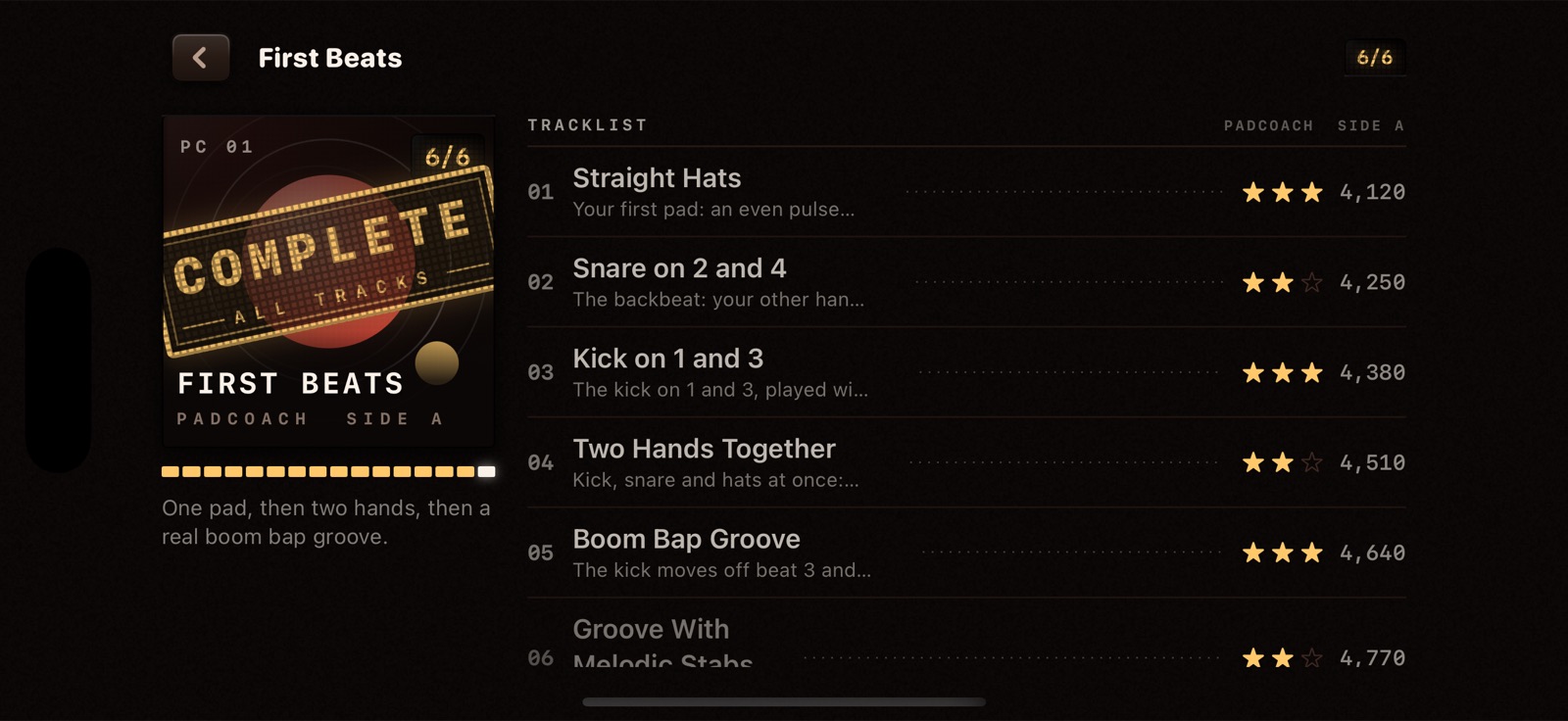
The First Beats tracklist screen: the album sleeve stamped COMPLETE beside a numbered list of the six lessons, each with a star rating and a best score.

04 / WHY IT STICKS

Built to make you good, not just busy.

HANDS AND FINGERS

Hands that find the pads on their own.

Every note shows a hand and a finger. The lesson decides, so you never guess, and you build good habits from day one. Soon your hands land kick, snare and hat without you looking down. Left handed? Every lesson flips for you.

Right hand Left hand

SCORING

Confidence you can take into a jam.

When PadCoach says you own a groove, you own it. A Perfect hit lands within 25 milliseconds of the beat, and a pass is never a free one. So when you play in front of someone, your hands hold up.

PACING

You never hit the wall that makes people quit.

One new idea per lesson, and nothing shows up before the lesson that teaches it. You drill each move on its own first, then play it inside the full beat. The hard part always arrives when your hands are ready for it.

PRACTICE TOOLS

No fill stays impossible for long.

The part that beat you on Monday is yours by Friday. Slow any take down and build it back up. Or turn on Wait Mode, and the beat waits until you hit the right pad. The same tools a patient teacher would use.


05 / WHAT YOU GET

One purchase. The whole instrument.

  • 74 Lessons across 13 coursesFrom your first hi-hat to a full sixteen bar beat, in a set, tested order.
  • 74 Original backing tracksOne per lesson, across ten sound worlds in nine keys. The melodic voices are built on real recorded instruments: a sampled electric piano, drawbar organ, string pad and bass.
  • Endless Endless Jam ModePlay until your health runs out, chase a high score, and post it to the Game Center leaderboard. Signing in is optional.
  • 30 The 30-Day PathA day-by-day plan through the curriculum with one encouraging reminder a day, and a five minute fallback so a busy day never breaks your run.
  • 23 Technique cardsShort, specific coaching you can reopen mid-lesson without losing your place.
  • 13 Chapters in the reference bookWhy finger drumming works, how to sit, how to practice, and what woodshedding actually means.
  • DAILY Streaks, stars and badgesDay streaks, one to three stars per lesson, and badges for lessons finished, perfect hits and hours practiced.
  • YOURS Left or right handed, three appearancesPatterns mirror for left handed players. Analog Heat, Twilight and Classic are all in the box.

06 / WHAT YOU PLAY ON

Made for the pads on your desk.

PadCoach is built for the controller you already own, because that is where the beats get made. Every lesson uses the layout your hardware already has, so every hour you put in lands on your own instrument.

  • Any class-compliant MIDI pad controllerWired over USB or paired over Bluetooth from inside the app. An MPC style grid is the home layout. Timing is read straight from the hardware, so your score is always fair.
  • Touch pads when the hardware is elsewhereA full 4 by 4 grid on the glass, graded on timing exactly the same way, so a trip or a lunch break still counts as practice. Only the Dynamics course needs the controller, because glass cannot tell hard from soft.
  • A warning when your audio goes to the controllerPlug a controller in over USB and it can quietly become your audio output. PadCoach notices, names the device, and tells you how to switch back.
  • Calibrated to your rigNudge timing from minus 50 to plus 200 milliseconds, and teach the app your soft, medium and hard hits per device.

Some controllers do not speak plain MIDI (NI Maschine is the usual one), so they will not show up. If your controller works in other iOS music apps, it will work here.

WORKS WITH YOUR PADS

  • Akai MPD
  • Akai MPK
  • Novation Launchpad
  • Yamaha FGDP
  • Ableton Push
  • ESI Xjam
  • Midi Fighter
  • M-Vave

If it sends plain MIDI over USB or Bluetooth, it should just work. These are the pads the finger drumming community plays most, not a certified list.

USB / BLUETOOTH MIDI
PAD 1 KICKPAD 3 HAT

At a glance

PlatformiOS 17 or later
DeviceiPhone and iPad
OrientationLandscape
InputClass-compliant MIDI, or touch pads
ExtrasGame Center leaderboard

READY WHEN YOU ARE

Five lessons from your first real groove.

Plug in your pads. Follow the highway. By the end of the first course you are playing a boom bap beat with both hands on your own controller, and you will know exactly which finger does what.

Coming soon on theApp Store
In beta testing now